Overview
This is a concise summary of the ZDX Diagnostics capability and how to choose the diagnostic method. It is a practical decision guide during live incidents or early triage. It helps troubleshoot:
- New or existing Client Agent issues
- Internet speed and performance complaints
- Network path and node problems
- Selection of ICMP vs TCP, Cloud Path vs bandwidth, and when to use deep diagnostics
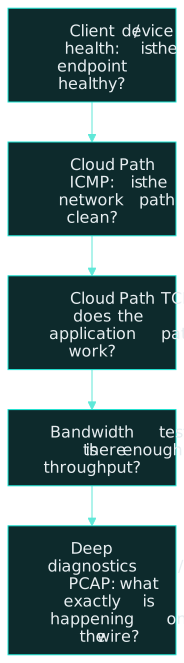
Start simple and move deeper only when needed:
- Client / device health. Is the endpoint healthy?
- Cloud Path (ICMP). Is the network path clean?
- Cloud Path (TCP). Does the application path work?
- Bandwidth test. Is there enough throughput?
- Deep diagnostics / PCAP. What exactly is happening on the wire?
Scope and applicability
Use this when the work is live-incident triage or early triage and the complaint is one of the following:
- A new or existing Client Agent issue
- Internet speed or performance
- A network path or node problem
- A choice between ICMP and TCP, Cloud Path and bandwidth, or a move to deep diagnostics
When a new diagnostics session is created, the choice is what kind of visibility is needed, not simply more data. Each option answers a different troubleshooting question.
Principles
- Start simple and non-intrusive.
- Do not mix protocols mid-investigation.
- Always match the test to the user complaint.
- Export results when escalating.
- Use ICMP first for network visibility.
- Path first, bandwidth second. Do not start with bandwidth testing. It creates load. Validate the path first with Cloud Path.
- Use deep diagnostics sparingly and intentionally.
Recommended configuration
Deep Tracing
What it is. Process-level and application-level telemetry from the endpoint. It correlates user experience with system and application behavior.
Use it when a new client agent is deployed and behavior is inconsistent, the user reports slowness but device metrics look abnormal, or you suspect application-level delays rather than pure network issues.
Do not use it if the issue is clearly network or ISP related, or you only need path or reachability information.
Hi-Fi Cloud Path
What it is. High-resolution, active path testing from the endpoint. It measures latency, packet loss, and jitter through nodes and hops.
Why it exists. To answer where performance is breaking.
Use it when the internet feels slow or unstable, you are troubleshooting a node, ISP, or routing issue, or you are comparing ICMP and TCP behavior to isolate a policy problem from a network problem.
Protocol choice inside Cloud Path. ICMP is for network health, routing, loss, and latency. TCP is for realistic application connectivity and port access.
Bandwidth test
What it is. A measurement of available upload and download throughput.
What it answers. Whether there is enough bandwidth.
Use it when Cloud Path shows clean latency and no loss, and users report slow downloads, video buffering, or large-file slowness.
Rule. Bandwidth tests generate traffic. Always validate the path first with Cloud Path.
Packet capture probing (PCAP)
What it is. A packet-level capture of network traffic. It shows TCP handshakes, retransmissions, resets, and errors.
Use it when a deep, application-specific failure persists, you are escalating to a vendor or Tier-3 engineering, or you need protocol-level proof.
Avoid it when the issue is obvious from Cloud Path or device stats, or you would be running a long, broad diagnostic without a clear hypothesis.
ICMP vs TCP
| ICMP | TCP | |
|---|---|---|
| Question | ICMPIs the user reachable? Where does latency or packet loss start? Is this an ISP or routing issue? | TCPThe app is slow or not loading. Ping works but the application fails. Is something blocking the connection? |
| What it tells you | ICMPBasic reachability. Latency, packet loss, and jitter. Hop-by-hop path behavior. | TCPApplication-style connectivity. Port reachability, for example 443. Firewall, proxy, or policy impact. |
| Best for | ICMPInternet slowness complaints. Intermittent connectivity. Identifying a bad network segment or node. | TCPSaaS applications such as O365, Salesforce, and ServiceNow. ZIA and ZPA access validation. Application-specific complaints. |
| Limit or insight | ICMPICMP may be deprioritized or blocked. It does not reflect real application behavior. Engineering rule: use ICMP first for network visibility. | TCPICMP good and TCP bad means a policy or security issue. |
Cloud Path vs bandwidth testing
Use Cloud Path when users say slow, laggy, or timeouts, when you need to see where performance breaks, or when you are diagnosing packet loss or latency.
Cloud Path answers where delay or loss begins, whether the issue is before or after the cloud edges, and which node or ISP segment is affected. Cloud Path is not a speed test and it is not a throughput measurement.
Use bandwidth testing when users say downloads are slow or video buffers, ICMP and TCP Cloud Path are clean, and you need to prove a link-capacity limitation.
Bandwidth testing answers available upload and download throughput, and whether congestion or saturation exists. Do not start with bandwidth testing. It creates load. Always validate the path first with Cloud Path.
When to use deep diagnostics
Use deep diagnostics when basic Cloud Path results are inconclusive, application failures persist with clean metrics, or you are escalating to a vendor or a higher-tier team.
Deep diagnostics provide packet-level visibility, TCP handshakes, retransmissions, resets, and protocol-specific failures.
Avoid deep diagnostics when the issue is clearly endpoint or ISP related, the investigation would be long and broad, or you do not have a focused problem statement.
Validation checklist
Scenario quick guide
| Scenario | Order |
|---|---|
| ScenarioNew Client Agent not working | Order1. Device stats, for client health. 2. Cloud Path (ICMP), for reachability. 3. Cloud Path (TCP), for application access. |
| ScenarioInternet feels slow | Order1. Cloud Path (ICMP), for latency and loss. 2. Cloud Path (TCP), for application realism. 3. Bandwidth test, only if the path is clean. |
| ScenarioApplication loads slowly | Order1. Skip bandwidth initially. 2. Cloud Path (TCP) directly to the application endpoint. 3. Deep diagnostics only if TCP shows anomalies. |
Common pitfalls
- Using Deep Tracing when the issue is clearly network or ISP related, or when you only need path or reachability information.
- Starting with a bandwidth test. The test generates traffic. Validate the path with Cloud Path first.
- Treating ICMP as application behavior. It may be deprioritized or blocked.
- Reading ICMP success plus TCP failure as a network-health problem. That pattern points to policy or security.
- Running PCAP when Cloud Path or device stats already explain the issue, or without a hypothesis.
- Using deep diagnostics for a clearly endpoint or ISP issue, for a long and broad investigation, or without a focused problem statement.
- Mixing protocols in the middle of an investigation.
References
Key takeaway
| Question you’re asking | Tool to use |
|---|---|
| Question you’re askingIs the network healthy? | Tool to useICMP Cloud Path |
| Question you’re askingDoes the app connect? | Tool to useTCP Cloud Path |
| Question you’re askingIs throughput enough? | Tool to useBandwidth test |
| Question you’re askingWhat exactly failed? | Tool to useDeep / PCAP |
Using the right tool at the right time reduces mean-time-to-resolution and avoids misleading results.
v1.1 – Added protocol, Cloud Path vs bandwidth, and deep diagnostics decision guidance.